Showing posts with label Firefox. Show all posts

Wednesday, January 28, 2009

优化Firefox 使其双倍速运行

设置内容如下:

使用其缓存特性减少Firefox内存使用率

1. 在Firefox浏览器地址栏中输入 “about:config” (无引号) .
2. 找到 “browser.sessionhistory.max_total_viewer”
3. 将其属性值改为 “0“;(零)

增加Firefox页面加载速度

1. 在lFirefox浏览器地址栏中输入 “about:config” 并且回车.
(一般情况下一般情况下一个页面仅发送一次请求.当你启用 pipelining it 将会发送多次请求, 这将大大加速Firefox页面加载速度.)
2. 更换以下内容:
设置“network.http.pipelining” 为 “true”
设置 “network.http.proxy.pipelining” 为 “true”
设置“network.http.pipelining.maxrequests” 为请求数量如 10.
这就意味着一次会发出10次请求.
3. 最后, 右键并且选择 New-> Integer. 命名 “nglayout.initialpaint.delay” 并且设置其值为“0“;.(零)
这个值是浏览器对收到信息的反应次数. 如果你是在使用宽带连接这样将加快Firefox页面加载速度.可选设置(可获得更快的加载速度) 如上新建如下变量New– > Interger or String
network.dns.disableIPv6: set “false”
“content.notify.backoffcount”: set “5“; (Five)
“plugin.expose_full_path”: set “true”.
“ui.submenuDelay”: set “0; (zero)

减少Firefox最小化时的内存使用量:

1. 同样在浏览器地址栏中输入about:config 并且回车.
2. 新建如下变量New -> Boolean.
3. 在弹出框中输入“config.trim_on_minimize”. 回车确认.
4. 选中True 并且回车s Enter.
5. 重启 Firefox.

Sunday, October 5, 2008

Adding Cisco.com Searches and Tools to Your Browser

http://www.cisco.com/web/tsweb/searchplugins/plugin_homepage.html#

This page shows how easy it is to add Cisco.com tool and search plugins to your Internet Explorer 7 and Firefox 2/Firefox 3 browser.
Just click the links below for the Cisco tools and searches you want to add to your browser.

Tools

Searches


Managing plugins for Firefox 2 and Firefox 3 browsers.


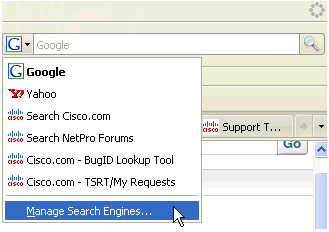
  1. Open the search pulldown window and select "Manage Search Engines".

    pulldown

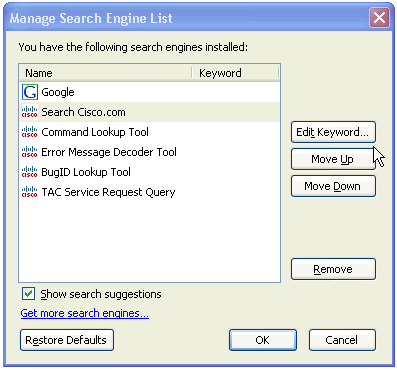
  2. This panel allows you to reorder search plugins or delete them.

    manage


Managing plugins for Internet Explorer 7 browser.


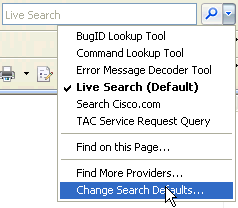
  1. Open the search pulldown window and select "Change Search Defaults".

    manage

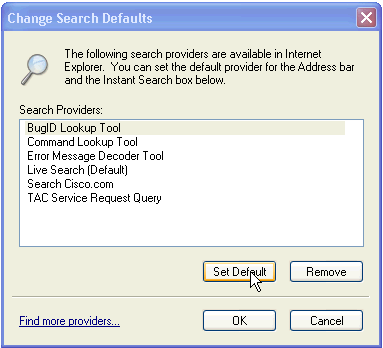
  2. This panel allows you to remove search plugins from your browser. Note that Internet Explorer 7 doesn't give you any options for setting the order of the search plugins.

    manage - step 2


The Plugin Available Indicator


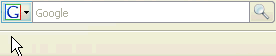
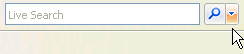
When browsing www.cisco.com you may notice the search plugin pulldown change color. This indicates that a browser plugin is available.

Firefox 2/Firefox 3
Internet Explorer 7
ff indicator
ie7 indicator


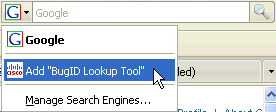
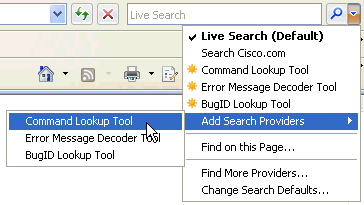
Open the pulldown box and select the plugin to add.


ff step1
ie7 step 1

Submit feedback about Cisco Search Plugins here.

Tuesday, September 30, 2008

Firefox Ubiquity 命令大全

多媒体相关 Ubiquity 已经内置搜索 YouTube, Amazon, 以及 Flickr 的命令,以下几个命令用来搜索那些多媒体网站:
  • Last.FM - 搜索Last.FM 中的艺人页.
  • Seeq - 从Seeqpod 搜索音乐.
  • Vimeo - 从 Vimeo 搜索视频.
  • Stickam - 从任何网页实时收看你的 Stickam 上的朋友的视频.
  • Netflix Search - 从 Netflix 搜索电影.


社会网络
目前,Ubiquity 只允许你同 Twitter 进行交互,以下命令允许你同更多社交网站交互
社会分享与书签网站
Ubiquity 默认支持 Digg,但以下命令允许你向 Reddit, Delicious, 以及其它相关网站提交书签或链接。
  • StumbleUpon - 发现你正在访问的页。需要 StumbleUpon extension 扩展。
  • Sphinn - 向 Sphinn 提交文章.
  • Reddit - 向 Reddit 提交链接。
  • Twine - 向 Twine 提交链接.
  • Delicious - 向你的 delicious 帐户提交书签以及标签.
  • Share On - 分享以下站点中的链接: Facebook, Reddit, Digg, Delicious, Slashdot, 或 Fark.
  • Most Popular on Delicious - 查看当前 delicious 中10大最受欢迎的书签.
  • Google Bookmark - 将当前网页提交给 Google Bookmarks.
  • Instapaper - 向你的 Instapaper account 帐户提交网页以便以后浏览.
  • Soup.io - 向你的 Soup.io 帐户提交链接.
  • Tumblr - 向 Tumblelog 提交共享链接.
  • Check Slashdot - 从 Slashdot 返回三篇最新文章,或者指定的任意文章。
其它命令
以下命令不好归类,但很好用:

Tuesday, September 9, 2008

Firefox Ubiquity 命令大全

  • Last.FM - 搜索Last.FM 中的艺人页.
  • Seeq - 从Seeqpod 搜索音乐.
  • Vimeo - 从 Vimeo 搜索视频.
  • Stickam - 从任何网页实时收看你的 Stickam 上的朋友的视频.
  • Netflix Search - 从 Netflix 搜索电影.


社会网络
目前,Ubiquity 只允许你同 Twitter 进行交互,以下命令允许你同更多社交网站交互
社会分享与书签网站
Ubiquity 默认支持 Digg,但以下命令允许你向 Reddit, Delicious, 以及其它相关网站提交书签或链接。
  • StumbleUpon - 发现你正在访问的页。需要 StumbleUpon extension 扩展。
  • Sphinn - 向 Sphinn 提交文章.
  • Reddit - 向 Reddit 提交链接。
  • Twine - 向 Twine 提交链接.
  • Delicious - 向你的 delicious 帐户提交书签以及标签.
  • Share On - 分享以下站点中的链接: Facebook, Reddit, Digg, Delicious, Slashdot, 或 Fark.
  • Most Popular on Delicious - 查看当前 delicious 中10大最受欢迎的书签.
  • Google Bookmark - 将当前网页提交给 Google Bookmarks.
  • Instapaper - 向你的 Instapaper account 帐户提交网页以便以后浏览.
  • Soup.io - 向你的 Soup.io 帐户提交链接.
  • Tumblr - 向 Tumblelog 提交共享链接.
  • Check Slashdot - 从 Slashdot 返回三篇最新文章,或者指定的任意文章。
其它命令
以下命令不好归类,但很好用:

Wednesday, August 20, 2008

Thursday, February 14, 2008

Make Your Extensions Work with the Firefox 3 Beta

Firefox 3 Beta only: If you've taken the plunge into testing the brand new Firefox 3 beta but your favorite extensions are disabled, that's because developers haven't updated them and may not be providing secure updates yet. If you're an impatient risk-taker who needs your extensions back NOW, here's a cheat that may get them to work. Big Honking Warning: Only do this if you're willing to deal with possible bleeding edge extension bugs and security risks!

  • Type about:config into Firefox's address bar and click the "I'll be careful, I promise!" button.
  • Right-click anywhere. Choose New>Boolean. Make the name of your new config value extensions.checkCompatibility and set it to false.
  • Make another new boolean pair called extensions.checkUpdateSecurity and set the value to false.
  • Restart Firefox.

Friday, July 27, 2007

40+ Firefox Add-ons for High Speed Blogging

Firefox works great on its own, but it’s the thousands of extensions
that make it excel. We’ve pulled together more than 40 add-ons for
Firefox that provide quick access to handy blogging tools. But whatever
you do, don’t install them all at once.

Blog Publishing


Blogger Bar - Search Blogger, “Blog This” function for any page you’re on.


Clipmarks - Clip any portion of a website to save, email or put on your blog.


Deepest Sender - Blog to multiple platforms from one window.


JustBlogIt - Just right click, and you’re blogging about the page you’re viewing.


LiveJournal Addons - Notifies you of friends updates, messages and more.


LiveJournal Hook - Gives you quick access to many LiveJournal commands and tags.


MySpace Blog Editor - Post directly from Firefox, drag and drop clips from sites.


Scribefire - A blog editor that integrates with your browser and allows you to drag and drop items from a web page into a blog post.


Twitterbar - Post to Twitter directly from the address bar.


WordPress.com Sidebar - Adds a quick access sidebar to get to your WordPress.com account.


Uploading Photos and Media


Fireflix - Sidebar extension to upload, browse, and manage your Flickr photos.


Firefox Companion for Kodak EasyShare Gallery - Upload photos directly to your Kodak EasyShare Gallery.


Firefox Universal Uploader - Universal program for uploading to sites such as Flickr, Picasa, YouTube, and Facebook.


FireFTP - An integrated FTP system that syncs and checks versions.


Flickr Sidebar - View the pictures in your account in a sidebar.


Fotofox - Select, tag, and upload images to popular sites such as Flickr.


ImageBot - Lets you upload photos to ImageShack or Photobucket.


OakFlickr4PFF - Allows uploading to your Flickr account.


Blog Tools


Adsense Notifier - Displays your current earnings from Google Adsense in the status bar.


Copy as HTML Link - Copies the address of a page to the clipboard as an HTML ready link.


Create short URLs - Right click an address, click wrapURL, and create a shortened URL for your use.


Dict - Highlight a word, right click it, select define and get a definition in a pop-up window.


DictionarySearch - Similar to Dict, but the result appears in a new tab.


FastDict - Add quick access to any number of dictionary sites to spruce up your blog entries.


ShrinkThisLink Link Shrinker - Use the ShrinkThisLink service without leaving the page.


Tiny.pl - Shortens an address via the tiny.pl service.


Blog Design, Customization and Development


ColorZilla - Get a color reading from any spot in your browser.


DT Whois - Adds a button for Domaintools.com whois service for the site you are currently viewing.


Firebug - Look under the hood of your favorite websites and take a peak at their code.


Greasemonkey - Allows you to run small java scripts to manipulate the way a page displays to you.


HTML Validator - Checks the validity of a page’s HTML and tells you the results in simple graphics.


IE Tab - Lets you view a webpage in an Internet Explorer tab without leaving Firefox.


iWEBTOOL Webmaster’s Toolbar - Allows you quick access to services and tools from iWEBTOOL.


JavaScript Debugger - In browser Java script debugging.


KGen - Allows you to see the strongest keywords for a given site.


LinkChecker - Checks the validity of all links on a given page.


Load Time Analyzer - Allows developers to measure how long a page takes to load.


MeasureIt - Draws out a ruler to get a pixel dimension of any element on a page.


MetaTags - Checks the meta information of a site and features an automated search engine submission tool.


RankQuest SEO Toolbar - Quick access to over 30 SEO tools.


SearchStatus - Keyword density analyser and checks backlinks.


SEOHAND - Tracks a site’s standings and creates graphs over time.


SEOQuake - Ever wonder why a page gets good search ranking? This will help you figure it out.


Web Developer - A highly regarded debugging tool for designers.


Powered by ScribeFire.