Showing posts with label Windows. Show all posts

Thursday, September 16, 2010

在Ubuntu里使用Windows的无线网卡驱动程序

1、准备好无线网卡的Windows驱动程序,我是用for Windows XP的。

2、先用有线网络联网,在新立得软件包管理器里安装ndisgtk。
或到 http://packages.ubuntu.com 下载ndisgtk、ndiswrapper-common和ndiswrapper-utils这三个.deb文件。然后按如下顺序安装这三个软件包:先装ndiswrapper-common,再装ndiswrapper-utils,最后装ndisgtk。

3、ndisgtk安装成功后,从菜单“系统——系统管理”中打开“Windows无线驱动程序”。点“安装新的驱动程序”。

4、选择无线网卡Windows驱动程序中的.inf文件。点“安装”。

5、可能会弹出提示说“不能确定硬件是否存在”,点“确定”。

6、然后在“当前已经安装的Windows驱动程序”列表中出现无线网卡的驱动,并显示“硬件存在:是”。点“关闭”。

7、这样就安装完成了。再点屏幕右上角的网络管理器,就能找到无线网络了。

本文地址:http://ubuntuabc.com/123/?p=26 来自:UbuntuABC

Sunday, May 9, 2010

Install Windows after Ubuntu Lucid Lynx

Sh*t happens. There is no more applications to manage my 6th generation iPod Classic 160 GB under Linux/Ubuntu. I have to install Windows as the second operating system along with newly installed Ubuntu Lucid Lynx (it rocks but this is for another post) to run iTunes.

For rather long time I’ve been using gtkpod, amarok, banshee, exaile or rhythmbox to sync my ipod under Linux/Ubuntu and load my music collection there. As we all know The Elder Brother Apple fights with interoperability and makes ipod/iphone users to use iTunes only. Any other applications that can read/write to ipod data format are prohibited by Apple. This also concerns Rockbox and ipod4linux alternative firmwares — once Apple encrypted ipod firmware it became impossible to use them. It definitely sucks. At least due to the fact there are millions of Linux users who are real or potential customers of Apple products. Anyways these facts have been discussed in various forums, blogs like this and similar but this post about how to install Windows as the second operating system along with Ubuntu or any other Linux.

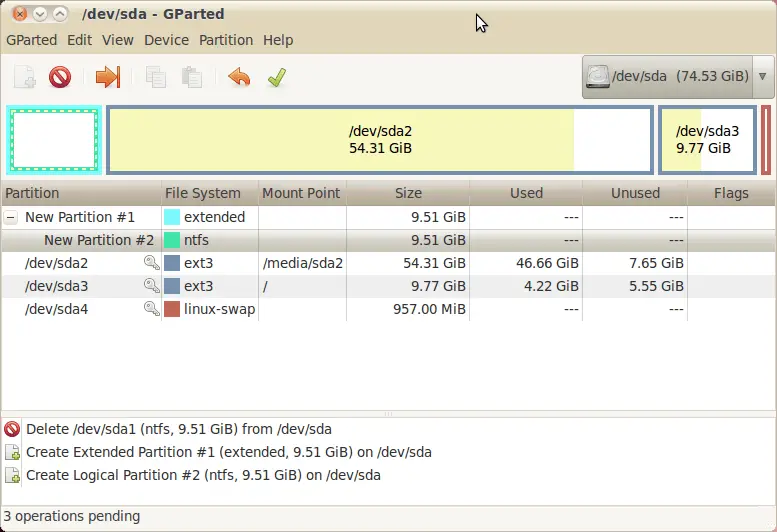
gparted exampleThe first that we need to do is to create new partition for Windows and format it to NTFS. Exact steps to accomplish this depend on your HDD partition table e.g. there is one large ext3/ext4 partition for Ubuntu or there are several partitions for various distributions or mount points. Anyway you should use partition manager to create and/or format NTFS partition. I use gparted. It is graphical and it just works (use ‘sudo apt-get install gparted‘ if you run Ubuntu/Debian).

Second you should backup your MBR record and restore it after Windows installation that silently erases existing bootloader and installs windows one, use “dd if=/dev/sda of=/mbr.bin bs=446 count=1” to save MRB into mbr.bin file and “dd if=/media/sda/mbr.bin of=/dev/sda bs=446 count=1” to restore it from file to HDD.

To sum everything up here is the algorithm:

0. BACKUP ALL YOUR DATA!
1. Create NTFS partition using gparted.
2. Backup MBR using dd command e.g. “dd if=/dev/sda of=/mbr.bin bs=446 count=1″ (/dev/sda means your HDD).
3. Boot Windows installation CD and install it onto newly created NTFS partition.
4. Boot into Linux live CD e.g. Ubuntu Live CD.
5. Restore MBR using dd e.g. “dd if=/media/sda/mbr.bin of=/dev/sda bs=446 count=1″.
6. Reboot.
7. Select Ubuntu in grub menu and boot it.
8. Setup grup for Windows booting.

In order to accomplish the last 8th item you should add the following text block to the end of grub config (read this article for detailed information):

title Microsoft Windows XP
root (hd0,1)
savedefault
makeactive
chainloader +1

Good luck!

P.S. If something goes wrong or you need more details you can take a look at the following article at ubuntu.com: Recovering Ubuntu After Installing Windows. It’s written in rather tangled manner but still informative.

Monday, January 25, 2010

Win7/vista实战Intel MY WIFI技术,使你的本本变无线热点(真正可用的方法!)

所谓的“My WiFi”技术,就是把笔记本电脑中的无线网卡虚拟成两个无线空间,充当两种角色:当与其它AP(无线信号发射点)相连时,这是传统应用模式,相当于一个普通的终端设备;当与其它无线网络终端设备(如电脑、手机、打印机等)连接时,可作为一个基础AP,此时只要作为AP的笔记本电脑能通过无线、有线、3G等方式连接入网,那么与之连接的其它无线网络终端设备就可以同时上网了。从使用上来看,英特尔的“My WiFi”技术和最近几年兴起的“闪联”标准有几分类似;英特尔的My WiFi技术是一项针对笔记本电脑无线网络模块功能扩展的技术,My WiFi技术使得用户可以让自己的笔记本电脑兼具无线AP的功能,使得其他支持WiFi的设备(最多支持8个设备)可以通过这台笔记本电脑所提供的AP功能实现相互之间的互联以及与外部网络的连接。目前可以支持该技术的无线网络模块共有两款,为英特尔Wireless WiFi Link 5100以及5300无线网络模块,也就是说,凡是采用这两款无线网络模块其中之一的笔记本电脑,都可以使用My WiFi技术。
一般来说,只要不太旧的本本都有这款无线网络模块,那么,本本就可以摇身一变成为wifi热点,这样,在家里,在宿舍里,别人的无线设备就可以通过已经连接了Internet的本本无线上网,Intel的my wifi软件里提供了强大的软件支持,通过该软件,可以很好的管理接入的设备,还能设置WEP密码,这样就能防止别的人使用我们的无线网,下面我就详细介绍如何设置该软件,首先我们需要下载软件,下面贴出迅雷的下载链接:
网盘:http://www.rayfile.com/files/5831de3a-cc24-11de-95b3-0014221b798a/

这是联想Y450的本本里官网的驱动,5***的无线网卡win7通用的驱动,如果无法安装,请到自己本本的官网上下载相应的驱动,安装的时候注意,要点自定义安装,安装过的也不要紧,再次运行该程序,选择“修改”然后选择安装实用程序。


非联想y450的去http://downloadcenter.intel.com/Product_Filter.aspx?ProductID=3017&lang=zho(一般的都是32位系统)

http://downloadcenter.intel.com/SearchResult.aspx?lang=zho&ProductFamily=%e6%97%a0%e7%ba%bf&ProductLine=%e6%97%a0%e7%ba%bf%e6%8a%80%e6%9c%af&ProductProduct=Intel%c2%ae+My+WiFi+Technology+(Intel%c2%ae+MWT)


(记住!一定要选自定义安装, 手动安装图片圈出来的内容!)
安装完成后,现在进入设置阶段,首先,确保无线打开,然后打开开始菜单中“Intel PROset 无线”-》Intel my wifi 技术出现如下画面


后点击绿色的“ 启用”

至此,已经建立了无无线热点,设备就可以发现这个无线网络,我们需要对它做一些设置,点 “配置式

出现下图,选择英特尔无线PAN ,选择编辑

出现下图
里面的常规选项卡里面可以选择编辑你的 无线网络名称

选择“安全”选项卡可以设置安全 类型和加密类型

这些设置和普通的无线网络都差不多,
至此,无线设备已经可以搜索到你设置的无线wifi热点了,但是还不能连接网络,我们需要对网络作一些设置—》制面板络和Internet—》网络和共享中心选择左边菜单里的“更改适配器设置 ”选项出现下图,(注意:无线网络名称可能不相同,等会选择共享的网络名就会不同)


然后选择本地连接,右键属性,选择共享选项卡,然后在家庭网络连接的下拉菜单里选择Intel my wifi pan,如下图


(此时选择共享的无线网络,以刚才已经 连接上的无线网络为准)

下面还需在完成一些 设置,点 配置式...


一定要上面第一个选项 禁用,选择后会弹出的对话框,点否就可禁用
现在便可以共享宽带了
原帖地址:http://bbs.lehu.shu.edu.cn/Article.aspx?aid=149663

Tuesday, December 8, 2009

Windows 7 Ultimate (旗舰版) 第四枚“神Key”

无需破解即可激活Windows 7旗舰版的第二枚“神Key”

无需破解即可激活Windows 7旗舰版的第二枚“神Key”及“神”之玄机和奥妙
在Windows 7全球发售日之前,我曾向大家提供过一枚无需破解即可激活Windows 7旗舰版的
“神Key”。今天提供的第二枚“神Key”与第一枚有异曲同工之妙:
在联网情况下,只要输入“神Key”,就可实现对于系统的直接激活(心诚则灵)或电话激活(绝对成功)。我想,大家不仅关注第二枚“神Key”的新面孔,
恐怕更关注隐藏在其后的“神”之玄机和奥妙——

第四枚“神Key”:87VT2-FY2XW-F7K39-W3T8R-XMFGF
第三枚“神Key”:236TW-X778T-8MV9F-937GT-QVKBB
第二枚“神Key”:KH2J9-PC326-T44D4-39H6V-TVPBY
第一枚“神Key”:TFP9Y-VCY3P-VVH3T-8XXCC-MF4YK

这两枚“神Key”,都是源于微软对于Windows 7使用者的“无偿奉送”(既然无偿自有无偿的道理),没有激活次数限制(何时停止使用取决于微软)。“神Key”与“MAK密钥”的本质区别在于:“MAK密钥”系大客户出资向微软购买享有使用权并有激活次数限制(停用或更换取决于大客户)。对于这两枚“神Key”的正确使用,参见《交流与分享:一枚“走红”的Windows 7旗舰版“激活密钥”以及“电话激活”方式图文详解》。

既然是“无偿奉送”,就不能等同于价值2600多元的零售光盘正版密钥。Windows 7用户如若追求100%的激活成功率,就得费点事通过电话寻求激活;如果连打电话都不愿意的话,那就只能靠多试若干次“撞大运”了。不过,“撞大运”也有机巧:如果第一次没有成功,不必着急等过一会儿再试,一般情况下一周之内总会成功的。至于隐藏在两枚“神Key”之后的“神”之玄机和奥妙,为了给大家增加点悬念和乐趣,我会于11月26日在这篇文章之后揭开这层“窗户纸”——

Sunday, November 1, 2009

Workaround for HTC Hero Sync Problem in Windows 7

HTC latest masterpieces, HTC Hero, packs with the most coveted features in the modern mobile world, including powered by Google’s famous Android operating system. However, many user who are running Windows 7 (either 64-bit or the 32-bit version) are having some trouble sync-ing their Hero to their computer, as the driver is not installed properly in Windows 7. This seems to be a common problem. Luckily there is workaround and alternative sync method, by following guide below.

hero

In order to get HTC Hero synchronizes with Windows 7 computer:

  1. Download latest specialized sync tool from HTC, namely HTC Sync 2.04 from HTC: HTCsync.zip
  2. Install the downloaded program on the computer. At this moment, your computer still unable to recognize the HTC Hero.
  3. Manually update the HTC drivers from Windows 7, using the Windows Vista drivers by installing HTC Sync software on a machine running Windows Vista and then copying the drivers (namely androidusb.cat, androidusb.inf, androidusb.sys, htcrndis.cat, htcrndis.inf and WdfCoInstaller01007.dll in HTC Drivers folder) over to the Windows 7 machine.

    Alternatively, download pre-downloaded HTC Hero drivers packaged in ZIP format:

    HTC Hero driver for 32-bit Windows 7: HTC_Driver_32.zip
    HTC Hero driver for 64-bit Windows 7: HTC_Driver_64.zip

  4. Extract the driver into a folder. For example, %SystemDrive%:\Program Files (x86)\HTC\HTC Driver\Driver Files\Vista_x64 (for the Windows 7 64-bit) or %SystemDrive%:\Program Files (x86)\HTC\HTC Driver\Driver Files\Vista_x86 (for the Windows 7 32-bit) accordingly.
  5. Go to Devices

    4) Update the driver (accessible from Properties -> Hardware tab) for incorrectly installed Android Phone from the Devices and Printers menu in Windows’ Start Menu, by selecting the copied driver location. If no ADB driver been installed yet, just install the driver directly by right click on the .INF file and select Install.

  6. The HTC Hero phone should now displayed as “My HTC”, and will be able to sync with Windows 7.

Thursday, October 29, 2009

Create a System Repair Disc in Windows 7

The new version of Windows seems to be a lot for stable than previous releases, however you never know when a malfunction might occur. Today we take a look at an option in Windows 7 that lets you create a System Repair disc in case you need to boot from it to recover your OS.

Create System Repair Disc

Type system repair disc into the search box in the Start menu.

1-sysp

The dialog box opens where you select the right drive and click Create disc. A CD will be fine as it only takes up 142MB of space.

3-sysp

Using the Disc

If you are having problems with your machine just pop in the recovery disc and boot from it and enter into Windows Setup [EMS Enabled].

4-sysp

After it boots up you can access recovery tools or restore the computer back to a system image (see our article on creating a system image in Windows 7).

5-sysp

Now you can choose from different recovery options to help you get your machine back up and running.

6-sysp

You never know when an Operating System disaster might occur, but having a System Recovery Disc to boot from should be part of your backup and recovery toolbox in case it does.

Monday, June 22, 2009

25 awesome Cross-platform games you can download for free

Regardless of what operating system you run on your computer, it doesn't have to be all work and no play. Heck, that could turn you into some kind of axe-wielding homicidal maniac bent on destroying your own family while watching over a remote resort hotel in the dead of winter.

I'd certainly never want that to happen to any of our DownloadSquad readers, so here's a list of games that you can install on Windows, Mac, and Linux (and some even on BeOS and BSD). Enjoy!

...And, as usual, if there's a particularly killer cross-platform game that I didn't include, feel free to post it in the comments -- and tell us why you love it!


Battle for Wesnoth - One of the best known open source games around, Wesnoth is an excellent fantasy-themed turn-based strategy game. There's plenty here to keep you busy - multiple campaigns and large maps, and online multiplayer for when you grow weary of playing on your own.

Battle Tanks - It's got colorful, cartoonish graphics, massive explosions, tanks....And best of all, it's got multiplayer. What could be more fun than blowing up your friends while causing immeasurable damage to an unsuspecting city?


Bos Wars - Realtime strategy in the future. With rocket tanks. That's a thousand times cooler than sharks with laser beams on their heads.

Crack Attack - No, it's not a Dope Wars clone - it's similar to Bejewelled or any of the other click-and-eliminate-blocks games that have been created by world + dog over the past few years. Bonus points to the developer for his awesome advanced features page.

Cube2: Sauerbraten - Another excellent open source FPS. One of the coolest things about it is that you can build and edit levels while you're in the game. There's also Quadropolis, a massive repository of goodies for the Cube engine including maps, scripts, and mods.

Eat the Whistle - If you're into uber-realist sports games, go ahead and scroll right past this one. If, however, you enjoy a little bit of humor and some old-school visuals, Eat the Whistle is a must-have download. Features sim, career, and arcade (complete with power-ups) modes.

FreeCiv - Another cornerstone of open source gaming. Inspired by Sid Meier's classic series, FreeCiv challenges you to develop your civilization from primitive roots into a thriving, modern society. Multiplayer mode support up to 30 (yes, 30) players. With more than 100 playable nations and 29 translations, FreeCiv is a truly international Time Waster.


FreeDroid - A modern take on the C64 classic Paradroid. It's a rich, futuristic RPG with plenty of robot butt kicking. In addition to dozens of different weapons, there's also a wide range of magic attacks, and you can even take control of your enemies and use them against each other.

Frets on Fire - If you've been looking for an excuse to rock out with your keyboard, go download Frets on Fire now. Tell your office mates your learning to play like Vadim Pruzhanov. Sure, he plays a different kind of keyboard, but it's still badass.


Glest - This fantasy themed RTS pits the opposing factions of magic and technology against each other. Do battle with mages, dragons, archers, horsemen, ornithopters, and more. If you grow weary of Glest itself, there are plenty of mods you can download to breath new life into the game.

Globulation 2 - A slick RTS that lets you focus on the "S" by intelligently handling part of the nettlesome micro-management this type of game usually requires. The game's built-in tutorial will help you learn how to build a powerful creature civilization that will be the envy of...er...other creatures.

Grid Wars 2 - There are times when playing this game makes you feel like you're trying to take on Asteroids, Tempest, and Gyruss all at once. If you like space shooters, bright, stunning visual,s and frantic gameplay, Grid Wars 2 will keep you riveted.

Hedgewars / Wormux - Two different takes on the turn-based goodness inspired by Worms. Both games feature awesome, cartoony graphics and fun gameplay, though I'm partial to Wormux (it may have something to do with the Gnu cannon).

LinCity - This popular open source city simulation hit version 2.0 this year, and it's looking better than ever. Manage your resources, keep people happy, and watch your creation grow into a booming metropolis - or cram everyone into spaceships and get the heck out of dodge - either way, you win!

Vega Strike - VS provides the backbone for a number of remix projects (like Pi Armada, Privateer Gemini Gold, and Parallel Universe). Explore space, build a trading empire, and blast your opponents to space dust. Plus, they just got their 'Super Ultra Cool Sound Systems' (SUCSS?) working last month.

Warsow - Warsow's developer credit Quakeworld, Quake CPMA, Jet Set Radio, and Speedball for inspiring aspects of their game, and it's a combination that really works. The game's fast pace and cell-shaded graphics work well together. Other cool features: dual firing modes (weak and strong) for weapons, wall jump, ramp slides, dashing, and dodging.

Widelands - If you enjoyed playing the Settlers games and haven't tried Widelands yet, now's the time. Lead your tribe to glory in single-player mode, or go multiplayer on your LAN or over the Internet. You and your friends can unite to form glorious new empires - or just try to kick the snot out of each other.

Wolfenstien: Enemy Territory - Mein Leben! Ok, so that was from the old, old Wolfenstein. The idea is the same: shoot all the bad guys or they'll shoot you (or blow you up). The links will take you to Planet Wolfenstein where you'll find downloads for all three OSes, map editors, source code, and more.

Yo Frankie! - Built on the Blender Game Engine, Yo Frankie is as good a 3d platformer as you'll find for free. There's lots of lighthearted action to enjoy, and new levels are constantly being developed by an enthusiastic community.

Neverball - If Marble Madness was cool, Neverball is absolute zero. Use your mouse to tilt the playing surface and manouver the ball to collect coins and reach the goal marker. The download also includes Neverputt, which is exactly what you think it is - a tilt-and-roll miniature golf game.

Phun - Two-dimensional physics sandbox tomfoolery! Create all kinds of crazy arrangements then turn Phun loose and see what happens. Objects can be made out of different materials, and they react in different ways. See how gravity, friction, and wind affect things. If only grade 12 physics had been this much fun...

Scourge - Scourge bills their project as a "graphical Rogue-like game." If that's true, think of Rogue as the plate and Scourge as a multi-layer, fancily decorated cake piled atop it. It's packed with open source Dungeons and Dragons style action. The project has some ambitious goals and is looking for contributors - if you enjoy playing it and can offer your skills, find the team on the #scourge IRC channel on Freenode.

Smokin' Guns - Take a Quake3-powered FPS, slather on some Briscoe County, Jr., and you've got Smokin' Guns. You can almost smell the black powder and road apples. It's good, old-fashioned, Wild West fun.

Vacuum Magic - If Luigi's Mansion left you thinking all vacuum-based games sucked, give this 2d side-scroller a try. It's just you and your mystical 'vacuum field' against all manner of nefarious critters. Suck in certain beasts and food items and you can spit 'em back out to inflict damage.

VDrift - Ever wished you could be just like Vin Diesel? I wouldn't go sharing that with too many people. On a related note, VDrift is an awesome 3D drift racing sim. The latest version boasts a smarter AI, better physics, new sounds, and improved overall performance.

FreeCol - Oh crap, I'm in trouble. As if I hadn't blown enough time over the years on the various Colonization/Civlization games. Explore new lands, build a nation, survive, and win! Thanks towcroskeys for suggesting this one!

Neuiz / Tremulous / Urban Terror - I included Nexuiz and Tremulous on a previous post, but all three of these great FPS games are worth mentioning again. There you go, zezke!

OpenArena / Alien Arena - By now you've noticed that cross-platform, open source gaming and FPS go hand in hand. Two more great choices, and as posted by 404 it may just have the most polished visuals of any in the bunch. Thanks to him, and to Austen for OpenArena!

Scorched 3D - A remake of the classic turn-based artillery game. Challenge other players online and be sure to check out some of the interesting mods, like Christmas and Stone Age. Big ba-da-boom. Thanks, Randy!

Warzone 2100 - Thanks to, er, John Doe for offering Warzone - a 3D RTS set in the future with a massive number of technologies (over 400) and units (more than 2,000). Multiplayer mode supports up to eight players.

Want more RTS action? Check out the list of games built on the Spring Engine, which feature themes like Star Wars, Gundam, and WWII (Spring: 1944). Thanks, Waldo!